Daily census & discharge intelligence
Developed recurring reporting that connects admission and discharge activity to unit-level census trends, giving stakeholders both an aggregate view of demand and the encounter details needed to validate it.
Several questions. One reporting foundation.
- How does average daily census differ across units and reporting periods?
- How do patient class, provider, and service change the activity visible to a leader?
- Which admissions and discharges account for a unit’s reported volume?
- Do reported totals agree with the operational activity stakeholders are seeing?
- In the portfolio enhancement, how does average length of stay vary by unit within the discharge cohort?
From source records to decision support.
Prepared and modeled the admission, discharge, and related time fields behind recurring census and discharge reporting across 12+ units. Built the Power BI experience around a selectable date range and patient-class, provider, and service filters, connecting summary views with encounter-level detail. The report combined unit-level census analysis with the records needed to explain and reconcile totals, supporting operational review and recurring DPHHS reporting needs.
What made the work demanding
A census is a snapshot of patients present, while admissions and discharges are events. Patients admitted before the reporting period can still contribute to census, and a discharge-based length-of-stay measure uses a different cohort again. Explicit population and time rules prevent a visually convincing dashboard from answering the wrong question.
What the work enabled
Provided leaders with a recurring view of unit activity and a way to investigate the encounters behind the numbers. Helped support demand and staffing conversations and the preparation of census / discharge reporting. No measured staffing savings or throughput improvement is claimed without supporting evidence.
What the reporting covered.
| Area | Reporting scope | Decision context |
|---|---|---|
| Activity | Admissions · Discharges | Distinguish event counts from the population present. |
| Unit demand | Average daily census by unit | Show where patient presence is concentrated. |
| Exploration | Date range · Patient class · Provider · Service | Let stakeholders isolate the population relevant to their question. |
| Traceability | Admission / discharge timestamps · Encounter detail | Connect report totals to individual source records. |
| Portfolio enhancement | Average LOS by unit | Adds duration context to volume; not represented as an original report feature. |
A dashboard you can explore.
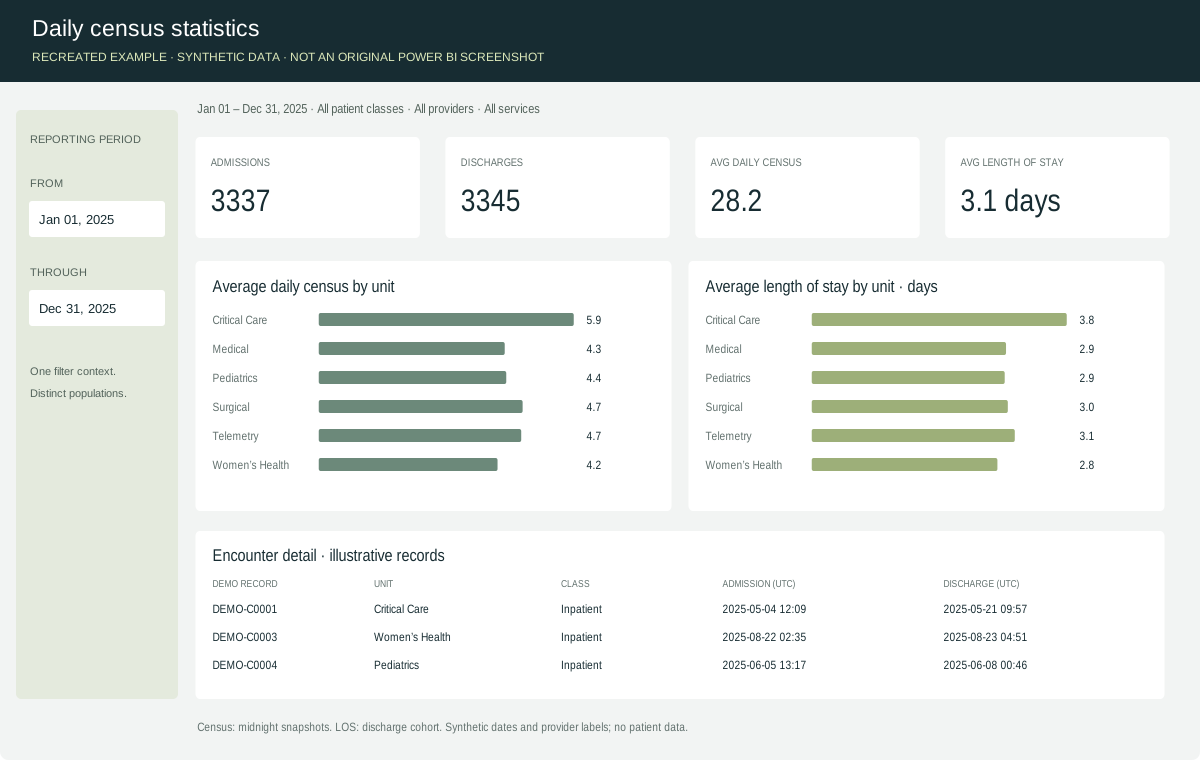
The full-year preview is illustrative. Open the demonstration to change filters and see the calculations update. Average LOS by unit is an added portfolio enhancement.
SQL samples are newly written demonstration patterns using fictional table names, not the original employer queries. No confidential schema or production code is disclosed.
Numbers that can be explained.
These checks make the analytical approach concrete. Where original validation artifacts are unavailable, this section describes the relevant checks rather than implying a published audit trail.
Reconcile unit and period totals to operational source reports and investigate differences with the stakeholders who use the numbers.
Check duplicate encounters and join expansion, unexpected nulls, and unit / class / provider mappings.
Check period boundaries, patients spanning the reporting window, discharge-before-admission exceptions, and location-history rules for unit attribution.
Reconcile admissions, discharges, census snapshots, and discharge-cohort LOS separately instead of expecting different cohorts to produce the same count.
Check that detail rows, unit summaries, and totals respond consistently to patient class, provider, service, and date selections.